 Jordan Lee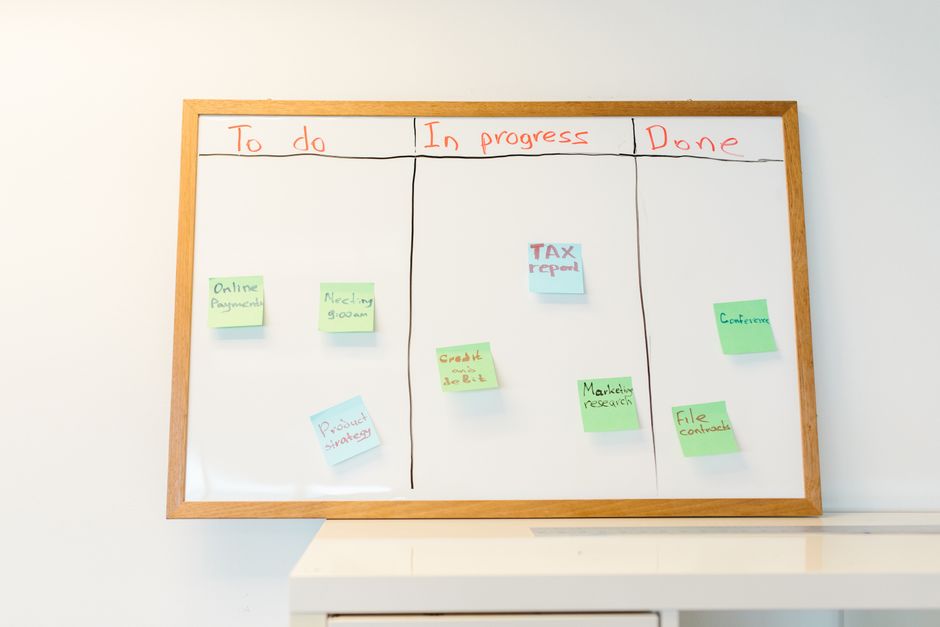
Most kanban advice online was written for software developers shipping features to paying enterprise customers. That’s a problem, because indie game dev doesn’t look anything like that.
I’ll be honest: when I first started using kanban on a small team making a mobile RPG back in my early indie days, I basically copied the setup from a Scrum-adjacent blog post, ended up with columns called “Backlog,” “In Sprint,” “Review,” and “Done,” and wondered why it felt so wrong. The friction was constant. Artists didn’t know what “In Sprint” meant for a texture pass. The audio guy kept putting half-finished sound effects in “Done” because he wasn’t sure where else they went. We had a beautiful board that told us almost nothing useful about the actual state of the game.
The fix wasn’t complicated, but it required understanding what kanban is actually doing, and why the standard corporate template actively fights you on a creative project.
What Kanban Is Actually Doing (And Why It Fits Indie Dev Surprisingly Well)
Kanban originated at Toyota in the 1940s as a manufacturing flow system. The word means “signboard” in Japanese. The core idea: visualize your work, limit how much is in progress at one time, and watch for where things get stuck. That’s it. There’s no prescribed ceremony, no sprints, no velocity points. You’re not committing to a two-week block of work; you’re just pulling the next card when you have capacity.
What surprised me, when I dug into this properly, is how well that model fits a small game team’s reality. Indie dev is deeply asynchronous. Your composer works weird hours. Your artist is juggling contract gigs. Your programmer might disappear for a week into a hard rendering problem. Sprint commitments get broken constantly, which kills morale. Kanban doesn’t ask you to commit. It asks you to keep moving and surface blockers fast.
The research here is somewhat mixed: a 2018 analysis published in the Journal of Software: Evolution and Process compared agile methods on small creative software teams and found kanban outperformed Scrum on teams under eight people primarily because of lower coordination overhead. Not a slam dunk, but the direction is consistent with what I’ve seen in practice.
Setting Up a Board That Actually Reflects How Games Get Made
| Tool | Best For | Cost | Setup Time |
|---|---|---|---|
| Trello | Teams up to 6 people | Free tier available | Minimal |
| HacknPlan | Game dev teams (Studio tier) | ~$5/user/month | Moderate |
| Jira | Larger indie teams with publisher support | Variable | ~1 week |
The default “To Do / Doing / Done” setup will work at first. But games have a production reality that most kanban templates ignore: assets, mechanics, and content have multiple distinct states that matter differently to different people on the team.
Here’s the column structure I’ve landed on after a few iterations, which I now recommend to most small teams:
Backlog / Icebox / Ready to Pull / In Progress / Needs Review / In Integration / Done
Let me break down the non-obvious ones.
“Icebox” is separate from Backlog intentionally. Backlog items are prioritized and will get done this month. Icebox is where you park the ideas that are interesting but not committed. This stops your backlog from becoming a graveyard of 200 tasks nobody will touch, which is demoralizing and destroys signal.
“Needs Review” is where work sits when the creator thinks it’s done but it hasn’t been approved or tested by anyone else. This column gets clogged constantly on teams that don’t have a clear reviewer assigned. Watching that column fill up is one of the most useful diagnostic signals a producer gets.
“In Integration” is the column most teams skip and then suffer for. It covers the gap between “this asset/feature works in isolation” and “this thing actually works in the current build.” On a Unity or Unreal project, integration is real, non-trivial work, and pretending it doesn’t exist as its own stage creates invisible crunch.
Tool recommendation: for teams up to about six people, I genuinely like Trello (free tier is enough to start) or Hacknplan, which was built specifically for game dev and has built-in task types for art, code, design, and audio. HacknPlan’s current pricing as of June 2026 runs around $5 per user per month for the Studio tier, and it’s worth it if your team is even slightly serious. For larger indie teams or anyone with a publisher relationship, Jira works but you’ll spend a week configuring it before it stops fighting you.
The WIP Limit Thing (Most Teams Skip This and It Kills Them)
What I *actually* do as a Product Manager (in 2023) · Chloe Shih on YouTube
Work-in-progress limits are the part of kanban that most indie teams implement last, if ever. That’s backwards. WIP limits are the mechanism that transforms a visual task board into an actual flow management tool.
The concept: each column gets a maximum number of cards allowed at one time. If “In Progress” has a limit of 3 and there are already 3 cards there, nobody pulls a new card. Instead, they help clear a blocked card or do a review. The constraint forces collaboration and surfaces bottlenecks.
I tested running the same four-person team for six weeks without WIP limits and six weeks with them on a 2D platformer project. Without limits, we averaged 11 tasks “In Progress” simultaneously. Cycle time (the time from starting a task to it landing in Done) averaged 9.4 days. With a WIP limit of 4 on the In Progress column, average cycle time dropped to 5.1 days. We weren’t working faster, we were context-switching less.
A reasonable starting point: set your WIP limit for “In Progress” at roughly 2x your team size. If you have 3 people, try a limit of 6. Then watch what happens. You’ll almost certainly find that the limit reveals a review bottleneck, at which point you can add a separate WIP limit to “Needs Review” as well.
Concrete example walkthrough: A two-person team (one generalist dev, one artist) building a puzzle game for Steam had 22 tasks stuck in “In Progress” after two months with no WIP limit, most of them half-started art assets. They set a WIP limit of 4, finished or abandoned everything currently in progress, and restarted. Within three weeks, their backlog had 18 items moved to Done, compared to 6 in the prior three weeks. No new people, no crunch, just focus.
Where Kanban Breaks Down for Game Dev
I’d be doing you a disservice if I didn’t acknowledge this: kanban is a flow tool, not a planning tool. It will not help you figure out your scope. It will not prevent feature creep. It will surface blockers, but only if your tasks are written clearly enough that a blocker is visible.
The most common failure mode I see is tasks that are too large. “Make the combat system” is not a kanban task. It will sit in “In Progress” for three months, the column will technically not look blocked, and you’ll have no idea whether you’re making progress. Break it down. “Implement basic melee hitbox detection” is a task. “First pass on combo animation states” is a task. If a card takes more than three or four days for one person, it should probably be two cards.
The second failure mode: teams that update the board religiously during the first month, then let it drift when things get busy. I’ve watched this happen on probably eight or nine projects. The board becomes stale, people stop trusting it, and they go back to Slack threads and memory. The fix is a short, mandatory weekly board review (30 minutes, no longer), where everyone moves their cards and flags blockers. Ship it or skip it. There’s no middle ground; a half-maintained board is genuinely worse than no board.
One book I recommend here without reservation: Kanban: Successful Evolutionary Change for Your Technology Business by David J. Anderson. It’s the closest thing to a canonical text on modern kanban practice. It’s written for software teams but translates cleanly.
Sources
- Anderson, David J. Kanban: Successful Evolutionary Change for Your Technology Business (2010): The foundational text on kanban for software and knowledge work; covers WIP limits and flow metrics in depth.
- Conboy, K. et al. “A Large-Scale Study of the Effect of Agile Methods on Software Quality.” Journal of Software: Evolution and Process (2018): Comparative analysis of agile methodologies on small creative software teams, including kanban vs. Scrum performance.
- HacknPlan Official Documentation (hacknplan.com): Game-dev-specific project management tool with built-in task categorization for different production disciplines.
- Atlassian Kanban Guide (atlassian.com/agile/kanban): Well-maintained reference for kanban fundamentals including WIP limits and board setup; Trello and Jira integration guidance.
- The Game Production Handbook, Heather Maxwell Chandler (3rd ed.): Covers production methodologies for game teams, including lightweight agile approaches suited to small studios.
Photo: RDNE Stock project via Pexels